If you’ve noticed your browser suddenly grinding to a halt while watching YouTube, you’re not alone. A widespread rendering bug is causing YouTube’s web player to lock browsers into an endless cycle of visual updates, sending CPU and RAM usage through the roof. This issue, first flagged in early 2025, has affected users across multiple browsers, leading to severe lag, stuttering, and even system slowdowns. Below, we’ve broken down the 10 essential things you need to know about this bug, from what causes it to how you can check if you’re affected — and what to do while we wait for an official fix.
1. The Bug: An Infinite Rendering Loop
At its core, the bug is a rendering loop hidden inside YouTube’s web player code. Normally, a browser only redraws parts of the page when something changes. But here, a flaw in YouTube’s script forces the browser to constantly resize and repaint video player elements — over and over, without pause. Think of it like a blinking light that never stops, except the light is your CPU working overtime. This loop doesn’t just slow down video playback; it can consume 100% of a single processor core, making everything else on your system feel sluggish.
2. Common Symptoms: Lag, Stuttering, and Frame Drops
Users first notice symptoms during video playback. The most common include choppy video (frame drops), audio desync, and a stuttering interface — even when pausing or skipping. The browser might become unresponsive for seconds at a time. You’ll also see the video player flicker or resize unpredictably. These issues occur because the browser is too busy running the rendering loop to actually display new video frames or respond to your clicks. The effect is most pronounced on lower-end machines, but even high-end gaming PCs have reported noticeable lag.
3. Affected Browsers: Firefox, Brave, and Others
The bug isn’t limited to one browser. Early reports came from users of Firefox and Brave, but it has also been spotted in other Chromium-based browsers like Edge and Opera. Notably, Chrome itself appears to handle the bug slightly better (likely due to different rendering optimizations), but it’s not immune. The common denominator is that any browser that strictly adheres to web standards can trip over the faulty YouTube code. If you’re using a less mainstream browser like Vivaldi or Pale Moon, you’re also at risk.
4. RAM Usage Can Skyrocket to Gigabytes
One of the most alarming symptoms is extreme memory consumption. Because the rendering loop runs millions of times per second, the browser quickly accumulates DOM changes and repaint instructions. Users have reported RAM usage jumping from a few hundred megabytes to over 2 GB for a single YouTube tab. In extreme cases, the browser may crash or the entire system may slow down as RAM fills up. This isn’t just a minor oversight — it’s a serious resource leak that can lock up your computer.
5. Root Cause: A Bug in YouTube’s Rendering Code
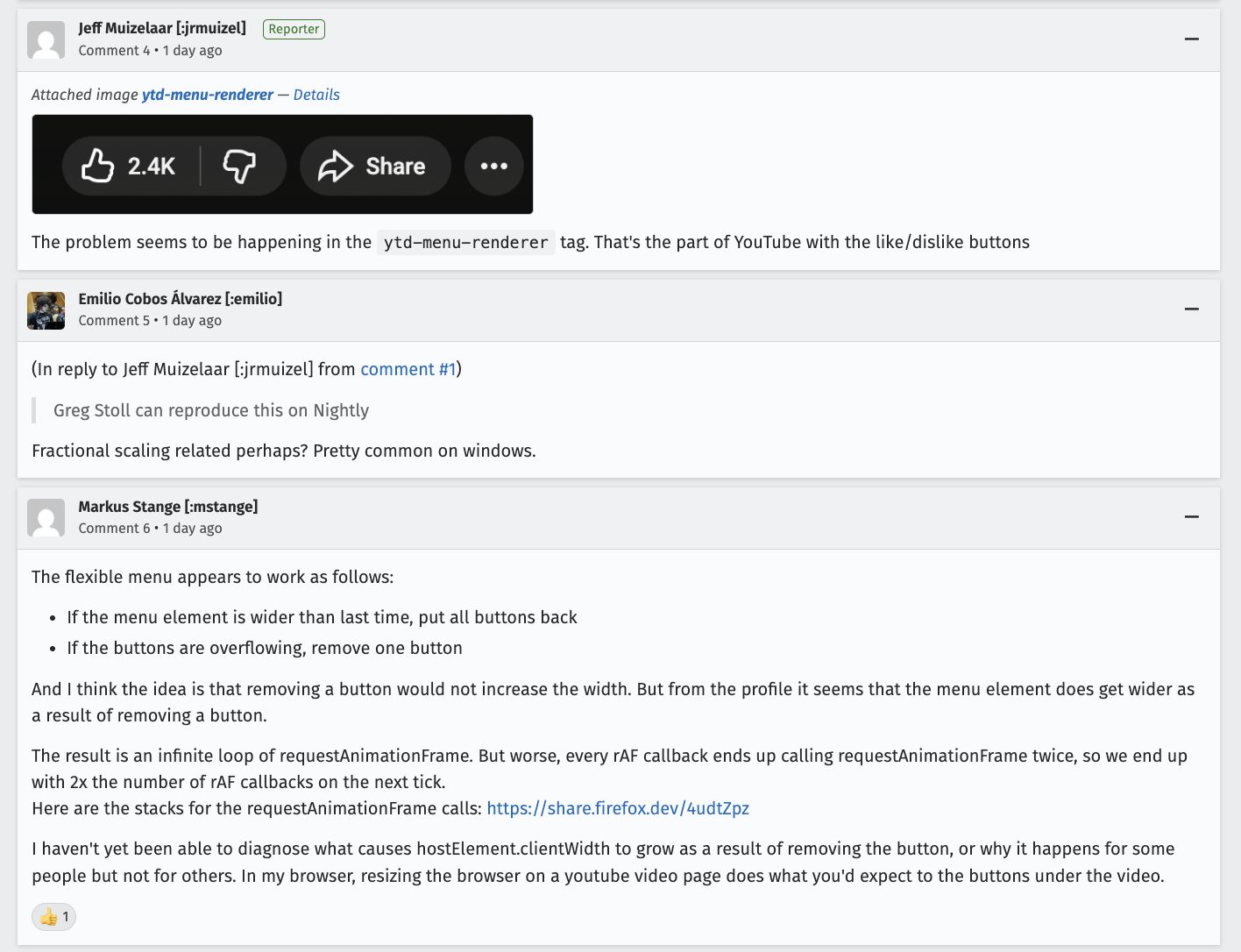
According to developers on the Mozilla Bugzilla thread, the bug originates from a recent change in YouTube’s player interface. It involves CSS and JavaScript that trigger a resize event on every frame, which then triggers another resize, creating the infinite loop. Essentially, the code tells the browser “if the player resizes, resize the container, then resize the player again.” This circular logic never reaches a stable state, so the browser keeps recalculating layouts endlessly.
6. Developer Discovery Through Bug Reports
Savvy users on Reddit first noticed the issue on platforms like r/firefox and r/brave_browser. They linked the lag spike to specific YouTube pages and began sharing details. Soon, developers from Mozilla and community contributors pieced together the root cause using browser dev tools. They found that the performance profiler showed thousands of “layout recomputations” per second. The Mozilla Bugzilla post (linked above) became the central hub for tracking the bug, where engineers from both Mozilla and Google eventually joined the discussion.
7. How to Check If You’re Affected
You don’t need special tools. Open your browser’s Task Manager (in Chrome: Shift+Esc; in Firefox: about:performance). Look for high CPU or memory usage from a YouTube tab. Alternatively, open YouTube and play a video. If the player flickers, or if moving your mouse over the video causes extreme lag, you’re likely hit. You can also open DevTools (F12), go to the Performance tab, and record a few seconds. If you see an almost vertical line of “Layout” events, the bug is active.
8. Temporary Workarounds You Can Try
While waiting for an official fix, you have a few options. Disable hardware acceleration in your browser settings — this forces the browser to use software rendering, which sometimes breaks the loop. Another trick: use Picture in Picture mode, which detaches the video from the main page and may avoid the resizing bug. Some users report that switching to the YouTube Old Layout (via a user script or extension) eliminates the problem. Finally, you can always use YouTube’s mobile site (m.youtube.com) on desktop as a temporary workaround.
9. YouTube’s Response and Official Fix Timeline
As of now, YouTube has acknowledged the bug internally but has not publicly commented. The Bugzilla thread shows that Google engineers are investigating and have a candidate fix under review. However, no official patch or update has been released yet. Given the widespread impact, it’s likely the fix will be rolled out within weeks. In the meantime, bookmark the Bugzilla page to track progress. Remember, the problem is server-side code, so you won’t need a browser update — YouTube will push the corrected script from their end.
10. Prevent Future Issues with Browser Updates
While this bug is YouTube’s responsibility, keeping your browser updated ensures you have the latest rendering protections and performance improvements. Browsers often add features to break malicious or problematic loops (e.g., Chrome’s “Heuristic” detection of infinite reflows). Once YouTube deploys its fix, you’ll need a modern browser to handle the corrected code efficiently. Also, consider using an ad-blocker or script-blocker (like NoScript) to disable non-essential YouTube scripts — some users found that blocking YouTube’s ‘annotations’ script stopped the loop entirely.
Conclusion
The infinite lag loop bug is a frustrating reminder of how fragile web applications can be, even on major platforms like YouTube. It’s caused hours of unusable video streaming for many, but understanding the bug’s mechanics helps you mitigate the worst of it. The good news: a fix is on the way, and the developer community has already provided rock-solid workarounds. Keep an eye on YouTube and your browser’s update schedule, and in the meantime, try the workarounds above to get back to smooth video playback.