Introduction
Modern AI workloads demand intense computational power, yet the underlying hardware is incredibly diverse—ranging from NVIDIA and AMD GPUs to custom silicon like Meta's MTIA. To make AI models run efficiently, engineers write specialized code called kernels, which translate high-level model operations into instructions optimized for each chip. However, manually authoring and tuning kernels for every new model and hardware generation doesn't scale. Meta tackled this challenge with KernelEvolve, an autonomous agent that treats kernel optimization as a search problem—evaluating hundreds of candidate kernels, learning from diagnostics, and outperforming human‑written code. This guide walks you through the core steps of that process, from identifying optimization targets to deploying high‑performance kernels across heterogeneous infrastructure.

What You Need
- Access to heterogeneous AI accelerators: NVIDIA GPUs, AMD GPUs, custom chips (e.g., MTIA), and CPUs.
- Understanding of machine learning models: Familiarity with ranking models, transformers, or other architectures that rely on custom operators.
- Knowledge of kernel programming languages: High‑level DSLs (Triton, Cute DSL, FlyDSL) and low‑level languages (CUDA, HIP, MTIA C++).
- A large language model (LLM) capable of generating and refining code (e.g., Meta’s Ranking Engineer Agent’s underlying LLM).
- A purpose‑built evaluation harness to run candidates, collect performance metrics, and feed diagnostics back.
- Automation infrastructure for launching and managing hundreds of kernel experiments in parallel.
Step 1: Identify Kernel Optimization Requirements
Every AI model has unique computational bottlenecks. Start by profiling your model on the target hardware to pinpoint the most time‑consuming operations. For ranking models, custom operators often go beyond standard GEMMs and convolutions. For each operator, define the performance goal—such as reducing latency by 20% or increasing throughput by 60%. This step creates a clear target for the search agent and ensures you focus on the kernels that matter most.
Step 2: Set Up a Search Framework for Kernel Variants
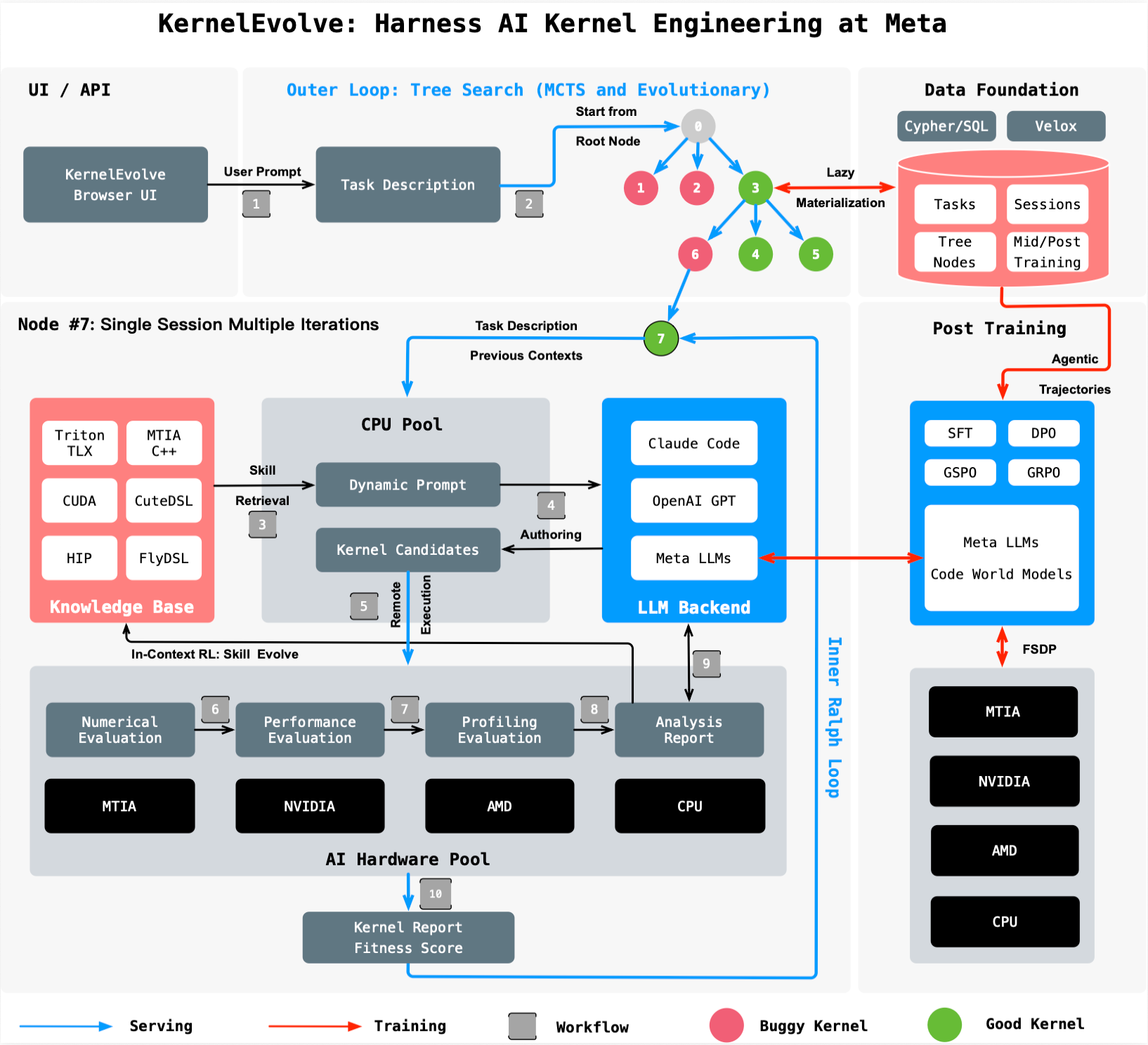
KernelEvolve treats kernel optimization as a search problem. Create a framework that generates many candidate implementations for each target operator. Use the LLM to propose variants by varying parameters like loop tiling, memory layout, thread block size, and instruction scheduling. The LLM should be prompted with the operator signature, target hardware, and any prior diagnostics. The goal is to cover the design space—ranging from default vendor‑library implementations to aggressive hand‑tuned approaches—without manual effort.
Step 3: Build a Purpose‑Built Job Harness for Evaluation
Each candidate kernel must be compiled and executed on actual hardware. Construct a job harness that can:
- Compile the kernel for the specific accelerator (e.g., using NVCC for NVIDIA GPUs or HIP for AMD GPUs).
- Run it on representative input sizes from your production workload.
- Measure key metrics: execution time, memory usage, numerical accuracy.
- Compare against a baseline (e.g., the previous best kernel or a vendor‑library version).
The harness should emit structured diagnostics that are easy for the LLM to ingest. This data includes error messages, profiling results (like roofline analysis), and performance counters. Without a robust harness, the feedback loop necessary for agentic improvement fails.
Step 4: Feed Diagnostics Back to the LLM for Iterative Improvement
This is the heart of KernelEvolve. After each evaluation, the harness sends the diagnostics back to the LLM. The LLM uses this information to understand why a kernel underperformed—for example, because of bank conflicts, insufficient occupancy, or poor memory coalescing. It then generates a new candidate that addresses those issues. The prompt should include the full evaluation log along with the original problem statement. Over many iterations, the LLM “learns” which transformations yield the best improvements for the given hardware, effectively simulating the intuition of a human expert.
Step 5: Automate Continuous Search Over Hundreds of Alternatives
Manual tuning might test a handful of variants. KernelEvolve scales this to hundreds or thousands automatically. The agent doesn’t stop after one improvement; it continues exploring until the performance gains plateau or the time budget is exhausted. Use a scheduler to launch multiple evaluations in parallel, leveraging the full capacity of your hardware fleet. The agent should maintain a performance leaderboard and only keep the best kernel for each operator. This continuous search ensures no stone is left unturned, and often finds solutions that even veteran kernel engineers would miss.
Step 6: Deploy Optimized Kernels Across Heterogeneous Hardware
Once the search concludes, integrate the winning kernels back into your production system. Because the kernels were generated for specific hardware types, you may have a family of optimized kernels—one for NVIDIA GPUs, another for AMD GPUs, yet another for MTIA. Ensure your inference or training framework can dispatch the correct kernel at runtime (e.g., via a registry keyed on operator + hardware). Monitor the deployed kernels to confirm real‑world improvements match the harness results. Meta reports over 60% inference throughput improvement for the Andromeda Ads model on NVIDIA GPUs and over 25% training throughput improvement for an ads model on MTIA, proving the value of this step.
Tips for Success
- Leverage high‑level DSLs first: They allow the LLM to focus on algorithmic optimizations without worrying about low‑level quirks. Only drop to CUDA or HIP when DSL‑generated kernels hit a ceiling.
- Invest in a flexible harness: Your evaluation infrastructure must support new hardware and kernel languages quickly. Otherwise, expanding to new chips becomes a bottleneck.
- Balance exploration and exploitation: The search agent should sometimes try radical changes (e.g., completely different tiling strategies) and other times fine‑tune the best performer.
- Keep a human in the loop: While KernelEvolve is autonomous, having a kernel expert review the top candidates for correctness and edge cases prevents subtle bugs from reaching production.
- Measure total time, not just kernel time: A faster kernel can sometimes increase memory pressure or data transfer times. Always evaluate end‑to‑end model performance.
- Document the search space: Record which transformations worked best for each hardware–operator pair. This knowledge can seed future searches and help your team understand hardware‑specific optimizations.
By following these steps, you can build your own agentic kernel optimization system—or adapt Meta’s approach to your infrastructure. The result is faster time‑to‑performance, freed‑up engineering effort, and models that run efficiently across the most heterogeneous hardware fleet.